One-Click Candidate Approval From Slack to ClickUp

Let a recruiter approve or reject a candidate from a single Slack click, no tool-switching needed.
Manually switching from Slack to ClickUp to move the task and log a hiring decision
~3 hrs/week
The Challenge
Reviewing a candidate meant a recruiter reading the details in Slack, then switching over to ClickUp to actually move the task and record a decision. An extra context-switch, multiplied across every candidate in the pipeline.
The Solution
Adapted from an n8n workflow built around a webhook and a two-way Switch node, the same decision logic runs in Zapier as a Catch Hook trigger listening for the Slack interactive-button payload, followed by a Paths by Zapier step that branches on which button got clicked. The Approve path updates the ClickUp task's status to HR Interview and posts a threaded Slack reply confirming the move. The Disapprove path updates the status to Rejected, sets the rejection-reason custom field, and posts its own threaded confirmation. Both paths finish with a Slack action that deletes the original button message so it can't get clicked twice.
How It Works
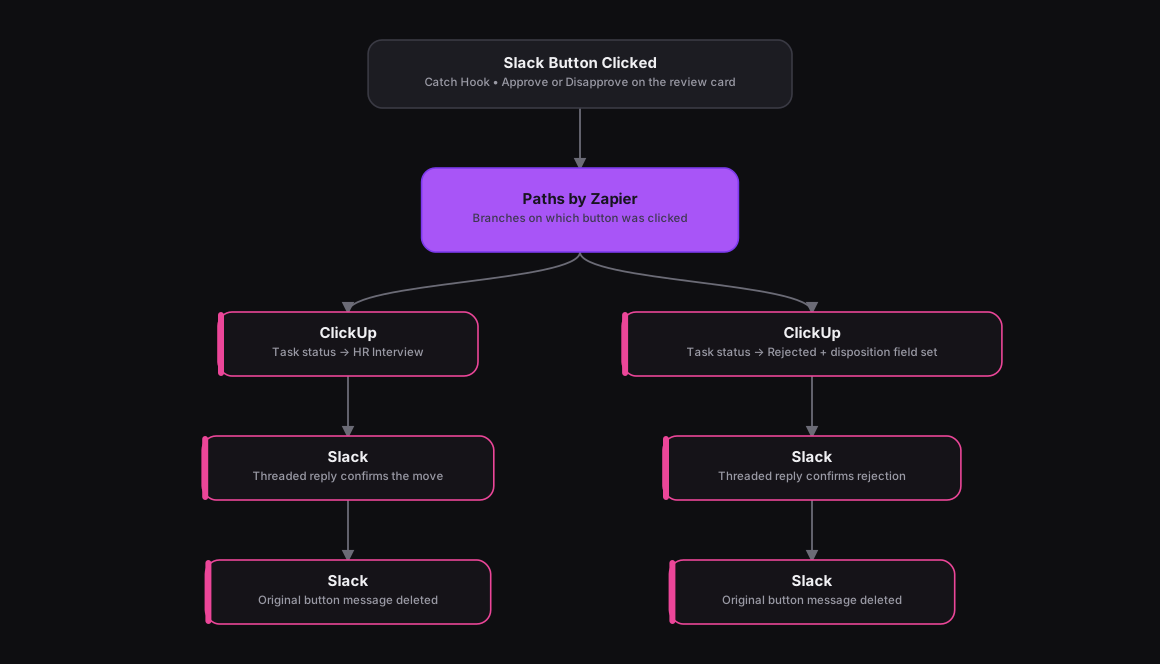
The Results
A recruiter can approve or reject a candidate without ever leaving Slack, and the ClickUp task reflects the decision right away instead of waiting on a manual update. Deleting the original button message after either path means a double-click can't reprocess the same candidate.
Tools & Technologies Used
How To Create This
- Set up a Catch Hook trigger in Zapier to receive Slack's interactive-button payload
- Add a Paths by Zapier step that branches on the clicked button's value (approve vs. disapprove)
- On the Approve path, add a ClickUp action to update the task status to HR Interview, then a Slack action to post a threaded confirmation reply
- On the Disapprove path, add a ClickUp action to update the status to Rejected and set the disposition custom field, then a Slack action to post a threaded confirmation reply
- End both paths with a Slack action that deletes the original interactive message so it can't be clicked twice
Related Case Studies
Auto-Logging Sales Meetings From Google Calendar Into Airtable
A Zapier setup that watches two reps' Google Calendars and drops every new sales meeting straight into a shared Airtable tracker.
Turning a Close CRM Note Into an Outbound SMS
A Zapier automation that lets a salesperson text a lead just by typing a tagged note inside Close CRM, no separate messaging tool needed.
