Auto-Logging Sales Meetings From Google Calendar Into Airtable

Turned every new calendar booking into an automatic, de-duplicated Airtable record.
Manually copying meeting name, time, and attendees into Airtable after every new booking
~2 hrs/week
The Challenge
Sales meetings got booked directly on two reps' Google Calendars, but nothing captured that booking anywhere else. Keeping a shared meetings tracker current meant someone manually copying the event name, time, and attendee list into Airtable every time a new meeting landed, an easy step to forget once a rep's day filled up.
The Solution
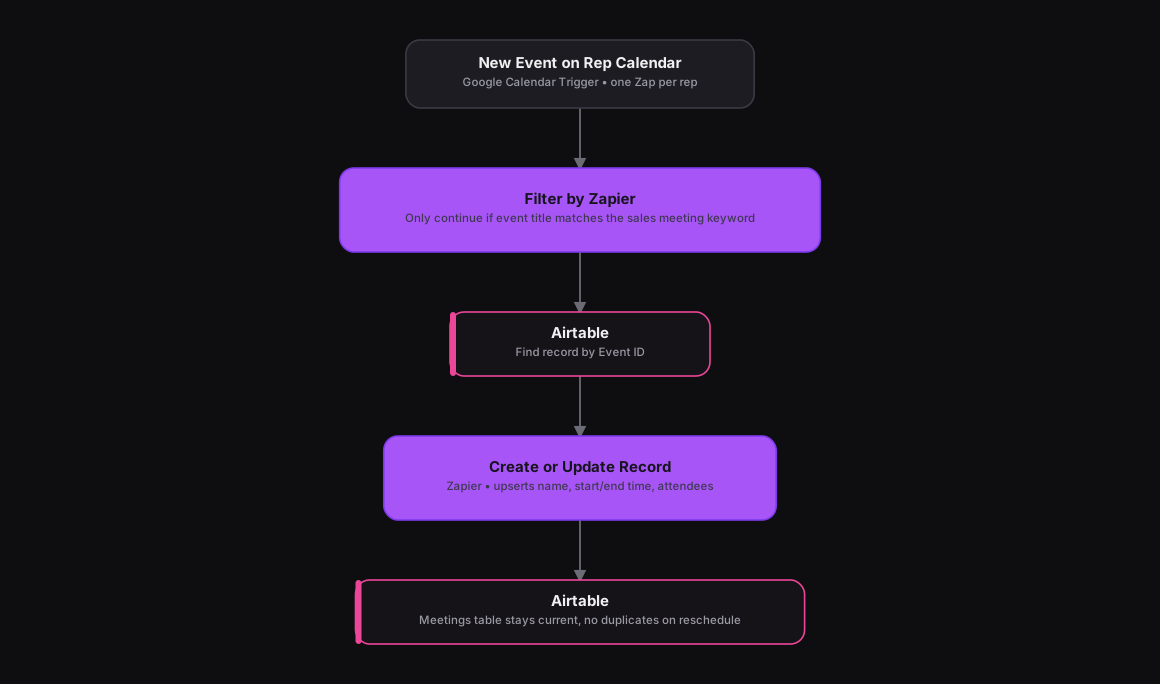
This one started out as an n8n workflow with two parallel Google Calendar triggers feeding a shared filter-and-upsert step. The same logic maps onto Zapier as two separate Zaps, one per rep's calendar, each triggered on New Event. A Filter by Zapier step checks that the event title contains the sales team's meeting keyword before moving on, so personal or unrelated calendar entries get ignored. The surviving event flows into an Airtable action that finds a record by the event's unique ID and updates it if found, or creates a new one if not, writing the meeting name, start and end time, and attendee list into the shared Meetings table.
How It Works
The Results
Every qualifying meeting on either rep's calendar lands in Airtable automatically, and nobody has to re-type details after the fact. The keyword filter keeps the tracker free of unrelated calendar noise, and the find-or-create step means a rescheduled meeting updates its existing record instead of creating a duplicate.
Tools & Technologies Used
How To Create This
- Create one Zap per rep's calendar, each using Google Calendar's New Event trigger
- Add a Filter by Zapier step that only continues if the event title contains the sales team's meeting keyword
- Add an Airtable 'Find Record' search on the event's unique ID to check for an existing meeting record
- Use an Airtable 'Create or Update Record' action to upsert the meeting name, start/end time, and attendee list
- Repeat the same Zap structure for the second rep's calendar so both feed the same Airtable table
Related Case Studies
One-Click Candidate Approval From Slack to ClickUp
A Zapier setup that lets a recruiter approve or reject a candidate right from Slack's buttons, and updates the ClickUp task the moment they click.
Turning a Close CRM Note Into an Outbound SMS
A Zapier automation that lets a salesperson text a lead just by typing a tagged note inside Close CRM, no separate messaging tool needed.
