Turning a Close CRM Note Into an Outbound SMS

Let a rep text a lead just by typing a tagged note, straight from Close CRM.
Manually leaving Close CRM to open a separate SMS tool and re-finding the lead's number
~2 hrs/week
The Challenge
Texting a lead meant a rep leaving Close CRM entirely to open a separate SMS tool, look up the lead's number again, and copy over whatever they wanted to say. Friction that made reps less likely to text at all, even when it was the fastest way to reach someone.
The Solution
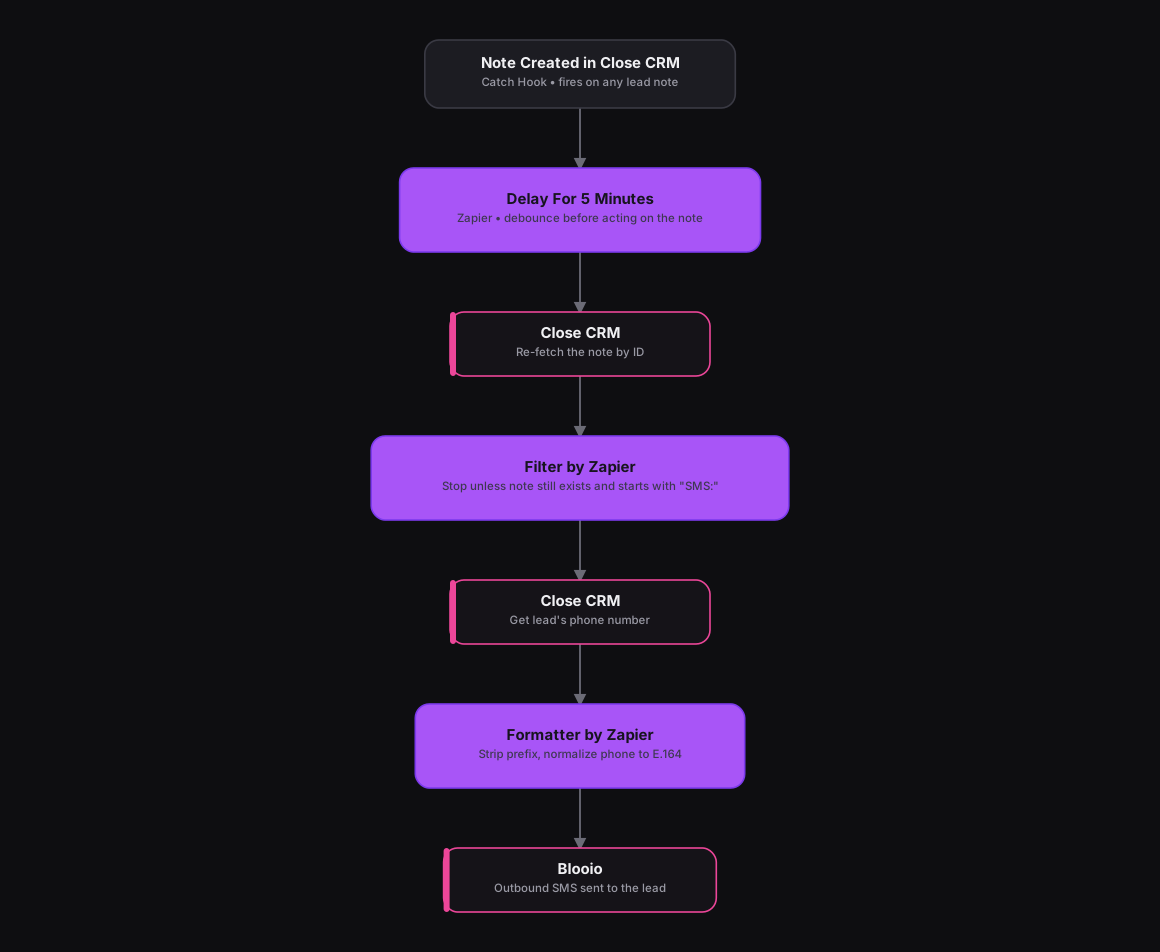
Adapted from an n8n workflow that debounces and double-checks the note before acting, the same safeguards carry over to Zapier. A Catch Hook trigger fires on Close CRM's note-created event, then a Delay For step holds for five minutes so an edited or deleted note doesn't slip through. A Close CRM action re-fetches the note by ID, and a Filter by Zapier step only continues if the note still exists and its text starts with "SMS:", so only notes explicitly tagged as a text request move forward. A second Close CRM action fetches the lead's phone number, a Formatter by Zapier step strips the prefix and normalizes the number to E.164 format, and a webhook action sends the finished message through Blooio's SMS API.
How It Works
The Results
A rep sends a text to a lead just by typing "SMS: ..." in a Close CRM note, no tool-switching, no re-finding the number. The five-minute delay and existence check mean a note that gets edited or deleted right after creation never turns into a stray text.
Tools & Technologies Used
How To Create This
- Trigger the Zap on Close CRM's note-created webhook event
- Add a Delay For Zapier step of 5 minutes to avoid acting on a note that gets edited or deleted immediately after
- Re-fetch the note by ID from the Close API and add a Filter by Zapier step that stops unless the note still exists and starts with "SMS:"
- Add a Close CRM action to fetch the lead's contact record and phone number
- Use a Formatter by Zapier step to strip the "SMS:" prefix and normalize the phone number to E.164 format
- Send the finished message through a webhook action to Blooio's SMS API
Related Case Studies
Auto-Logging Sales Meetings From Google Calendar Into Airtable
A Zapier setup that watches two reps' Google Calendars and drops every new sales meeting straight into a shared Airtable tracker.
One-Click Candidate Approval From Slack to ClickUp
A Zapier setup that lets a recruiter approve or reject a candidate right from Slack's buttons, and updates the ClickUp task the moment they click.
