An Early-Warning System for Stalled Hiring Pipelines

Built an early-warning system that flags stalling hiring pipelines before anyone has to go looking for them.
Manually digging through Workable's tracker for every open role just to spot a stalling pipeline
~6 hrs/week
The Challenge
Hiring managers had no easy way to tell a healthy pipeline from a stalling one. The only option was digging through Workable's tracker by hand for every open role, so a role could go weeks without qualified movement before anyone caught it.
The Solution
The n8n version combined a batch loop with a rate-limit delay to avoid hammering the API. Make's native iteration tools skip that manual pacing entirely. A Scheduler module runs every 15 minutes, and a Set Variable module computes a 30-day lookback window in the America/New_York timezone. An HTTP module fetches every active Workable job posting, and an Iterator module processes one role at a time, normalizing job titles so multiple postings for the same role group together. For each role, a second HTTP module fetches candidates updated in the last 30 days, and an Aggregator tallies applicants, case-study passes, active interviews, and rejections. A Router module checks five stall conditions per role, things like too few applicants by day 3, no qualified screens by day 5, or no client-ready finalist by day 10. A Google Sheets module then upserts one row per role into the shared hiring dashboard.
How It Works
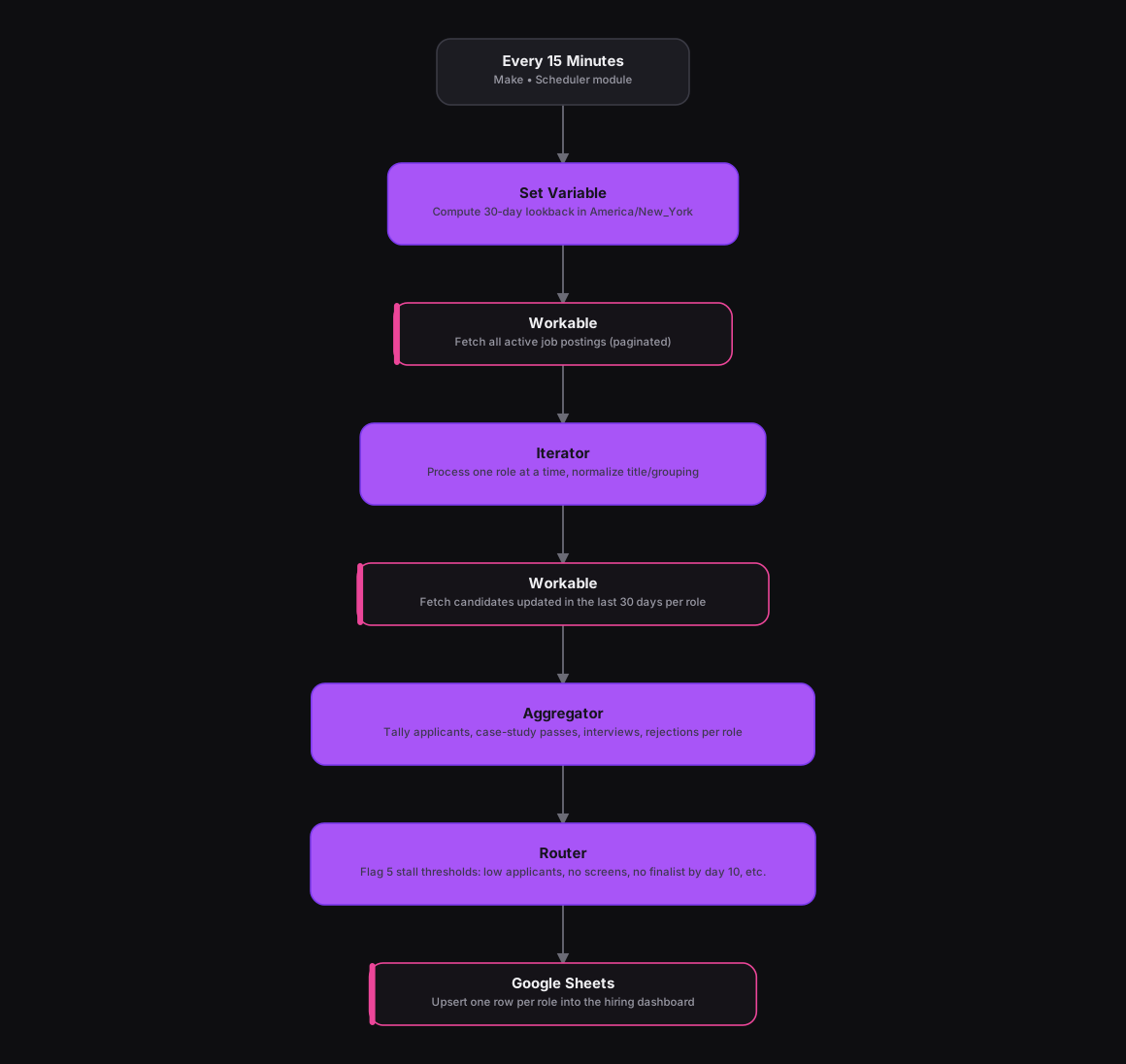
The Results
Hiring managers now get an automatically refreshed view of every open role's pipeline health instead of digging through Workable by hand, with specific stall conditions flagged the moment a role crosses a risk threshold. And Make's built-in iterator and pagination handling get through every job and its candidates without the rate-limit delay the original build needed.
Tools & Technologies Used
How To Create This
- Trigger the scenario on Make's Scheduler module, set to run every 15 minutes
- Use a Set Variable module to compute a 30-day lookback window in the correct timezone
- Add an HTTP module to fetch every active job posting from the Workable API
- Use an Iterator module to process each role individually, normalizing job titles so postings for the same role group together
- Add a second HTTP module per role to fetch candidates updated in the last 30 days, then an Aggregator module to tally funnel stage counts
- Use a Router module to flag the five stall thresholds per role, and a Google Sheets module to upsert one row per role into the hiring dashboard
Related Case Studies
Turning a Sales Rep's Typeform Check-In Into a Slack Scorecard
A Make.com scenario that turns a sales rep's end-of-day Typeform check-in into a clean, formatted Slack scorecard. No manual compiling needed.
A Daily Recruitment KPI Scorecard Built From Google Sheets
A Make.com scenario that pulls each recruiter's weekly KPI progress from a Google Sheet and posts a formatted scorecard to Slack every weekday evening.
