Turning a Sales Rep's Typeform Check-In Into a Slack Scorecard

Turned a raw Typeform submission into a clean, visual Slack scorecard automatically.
Manually scrolling through raw Typeform dumps to find each rep's scores and checklist items every day
~3 hrs/week
The Challenge
Managers wanted a quick daily read on rep readiness and activity, but raw Typeform submissions weren't built for that. Reading one meant scrolling through an unformatted question-and-answer dump just to find the handful of numbers and checklist items that actually mattered.
The Solution
This one started as an n8n workflow that did all the formatting in one code node. In Make, that logic splits naturally across modules instead. A Typeform module triggers the scenario, and a Set Variables module matches the five 1-5 self-assessment scores, a free-text notes field, and a multi-select daily checklist, all by question text. An Iterator module splits the checklist into completed and missed items, and a Text Aggregator builds the visual bar-rating strings, works out the average score, and assembles the full Slack Block Kit payload. A Slack module posts the finished scorecard to the sales channel, and Make's built-in error handler catches any failure and posts a fallback alert instead of letting the run break silently.
How It Works
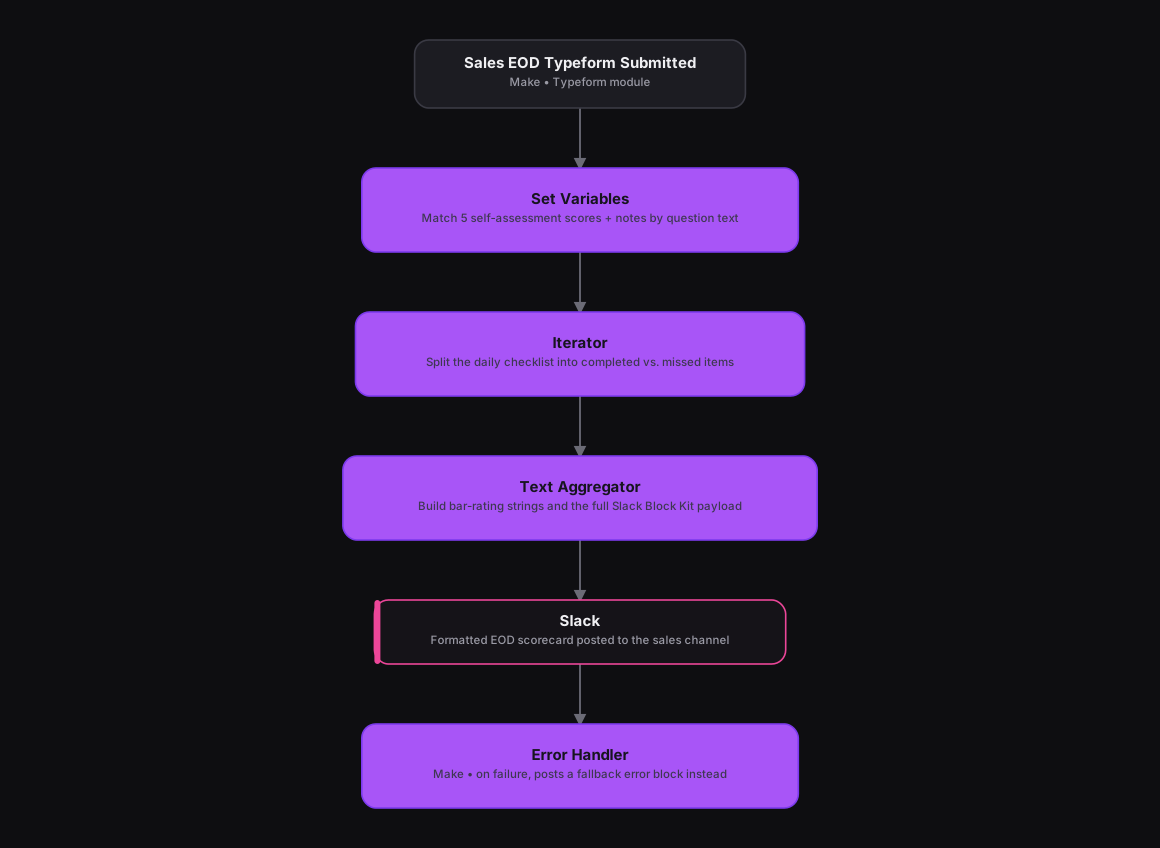
The Results
Managers now get a glanceable, consistent scorecard for every rep instead of a raw form dump, with scores, a completed-vs-missed checklist, and the rep's own notes all in one place. And since the formatting logic lives in separate Make modules instead of one big script, a piece like the scoring bar or the checklist split can be tweaked on its own without touching the rest of the scenario.
Tools & Technologies Used
How To Create This
- Trigger the scenario on Make's Typeform module for new EOD check-in submissions
- Use a Set Variables module to match the five self-assessment scores, notes, and checklist answers by question text
- Add an Iterator module to split the daily checklist into completed and missed items and count each
- Use a Text Aggregator module to build the bar-rating strings and assemble the full Slack Block Kit message
- Post the finished scorecard with a Slack module, and attach Make's error handler so a failure posts a fallback alert instead of breaking silently
Related Case Studies
A Daily Recruitment KPI Scorecard Built From Google Sheets
A Make.com scenario that pulls each recruiter's weekly KPI progress from a Google Sheet and posts a formatted scorecard to Slack every weekday evening.
Daily Overdue-Task Alerts Across Every Client Agency
A Make.com scenario that checks every client agency's ClickUp list each morning and sends a Slack alert into that agency's own channel for anything overdue.
